
How to Add a Booking Link to Your Instagram Bio
To add a booking link to your Instagram bio, tap Edit profile, then Links, then Add external link, and paste your booking page URL. Instagram allows up to five links. In India the native Book Now button rarely applies, so your bio link should show your services, prices and available slots itself.
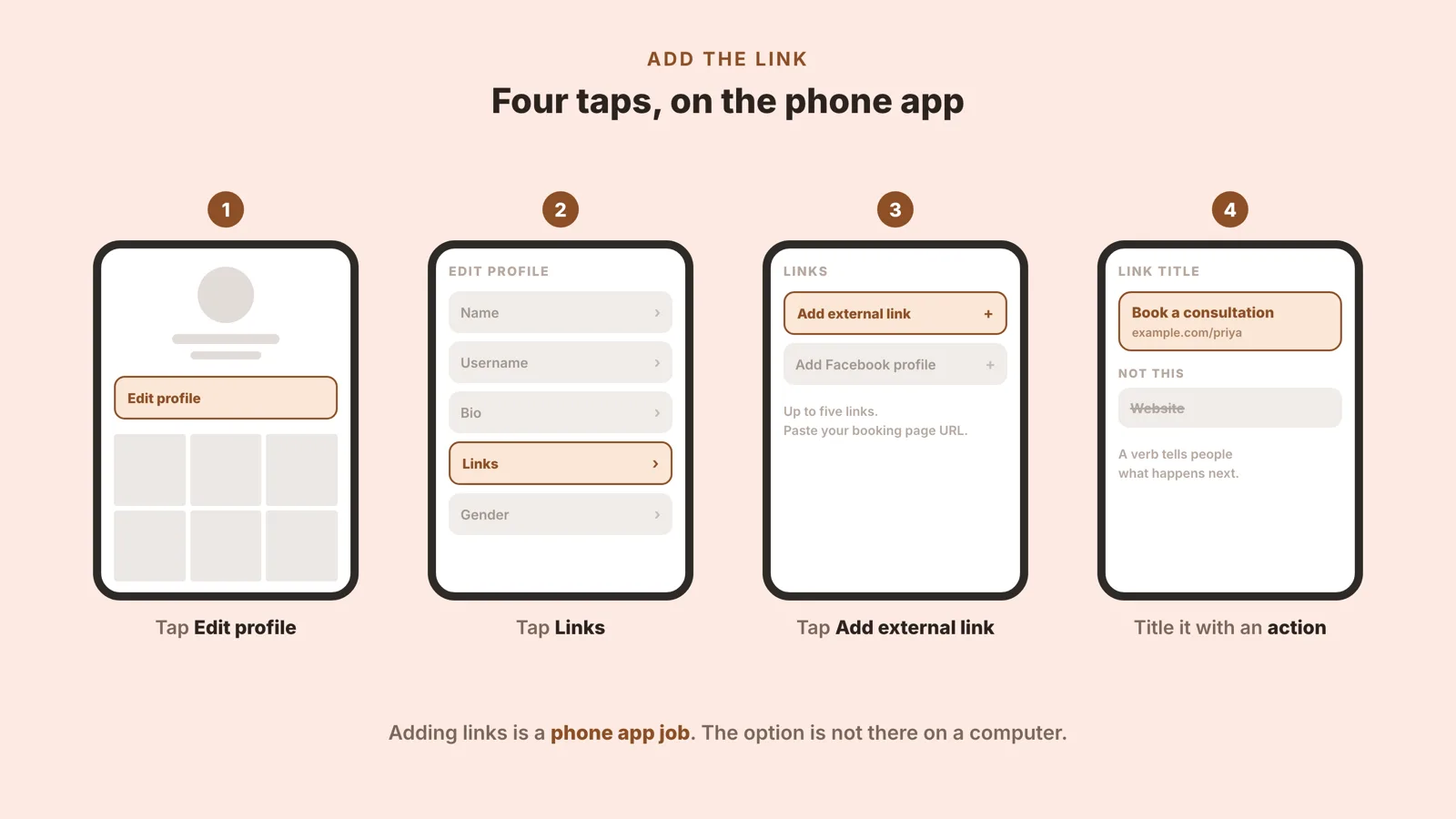
Add Your Booking Link in Four Taps
Open your profile in the Instagram app and tap Edit profile at the top of the screen.
Tap Links. This is the section that holds your external links, and it is separate from the bio text above it.
Tap Add external link and paste the URL of your booking page.
Give the link a title that says what happens next, such as Book a consultation, then tap Done.
That is the whole mechanism. A few things are worth knowing before you use it. You can hold up to five links, not one, so the booking link does not have to displace anything you already had there. The Links screen also lets you drag them into a different order, under Options and then Reorder links, which matters more than it sounds and is covered further down.
Two smaller things catch people out. The first is that this is a phone job: Instagram's own help page for adding a website says plainly that the feature is not available on computers, so if you have been hunting for it on a laptop, that is why you could not find it. The second is that you do not need a business account for this. Links in bio work on a personal account too. The account type only starts to matter for the Book Now button, which is the next section.
Step labels, the five-link limit and the desktop restriction read from Instagram's own Help Centre article "Add a website to your Instagram profile" (help.instagram.com/362497417173378, iPhone App Help) on 3 September 2026. Meta changes this interface without notice, so check the labels in your own app if they look different.
Title the link with an action, not a noun
The one judgement call in an otherwise mechanical job is what you call the link. Instagram shows the title, not the URL, so the title is the only thing a person reads before deciding whether to tap. Website tells them nothing they did not already assume. Book a consultation tells them what is on the other side and what will happen when they get there. Use a verb, keep it short enough not to truncate, and say the thing you actually want them to do.
Why the "Book Now" Button Usually Is Not an Option in India
Almost every guide to this subject opens by telling you to add Instagram's native Book Now action button, the one that sits under your bio next to Message and Email. It is a good button. It is also, for most independent professionals working in India, not available, and none of those guides says so.
The button is not something you type a URL into. It has to be connected to a scheduling tool that Instagram has approved, and Instagram publishes the list. Four conditions come with it:
The action button is available on business and creator accounts only. Instagram's help centre states this in one line.
It only connects to a tool on Instagram's approved partner list, which the company describes as "a select number" of partners that it hopes to expand.
You must already have an account with that partner before you can select it. The button links an existing subscription; it does not create one.
Only one action button can be displayed on a profile at a time, so it is Book Now or Reserve or Order food, never two.
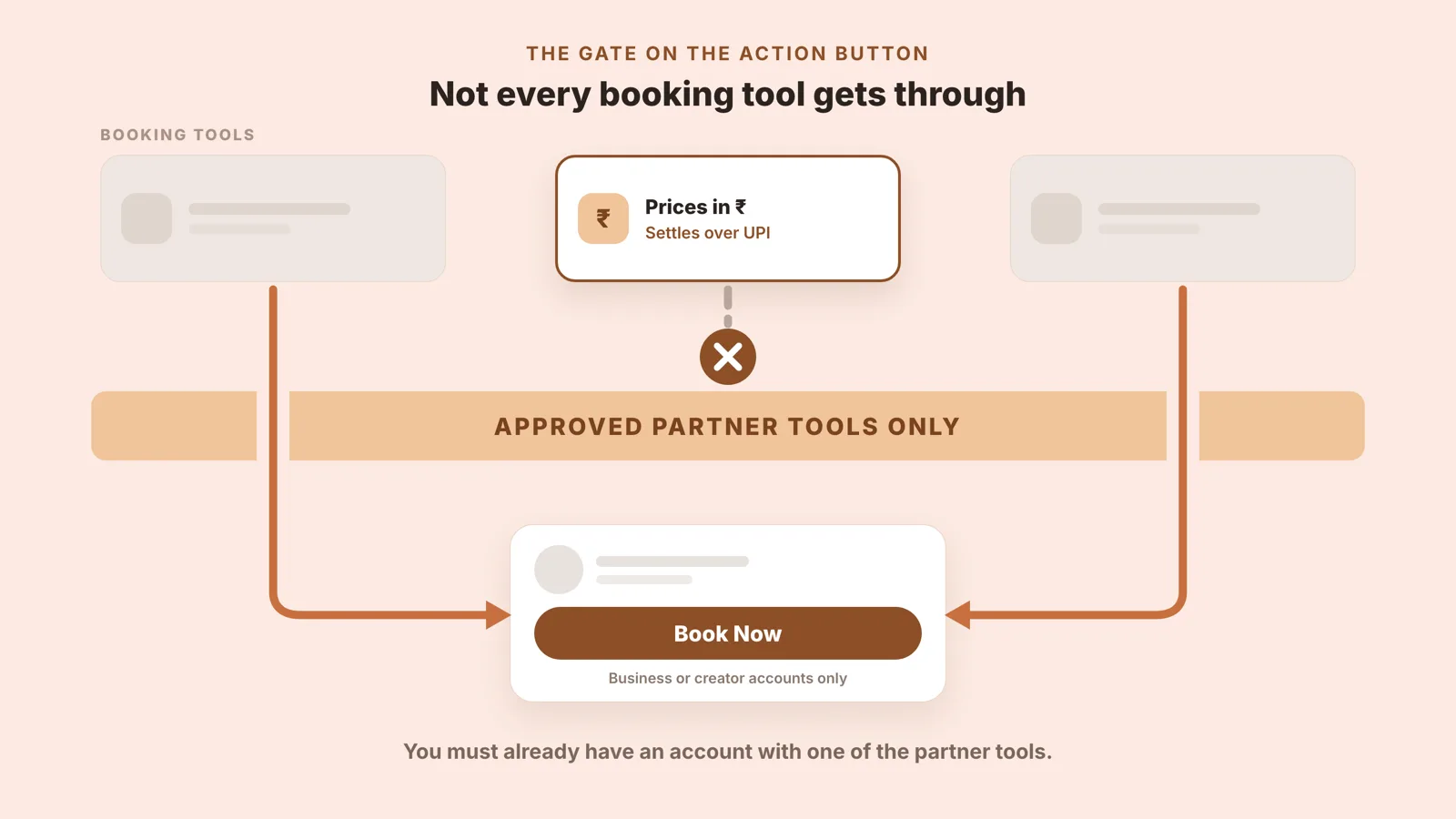
The partner list is the part worth reading yourself. As published on 3 September 2026, the tools Instagram names for Book Now are Acuity Scheduling, Appointments by Square, Appointy, Avec, BeautyDate, Booksy, Fresha, GenBook, GetSquire, Gettimely, GlossGenius, Gopanache, MyTime, Salon Iris, Schedulicity, Schedulista, Setmore, Shore, StyleSeat, SumUp, Treatwell and Vagaro. Instagram calls that "a list of some partners", so treat it as indicative rather than complete, and check it before you rely on it.
Read the list and the gap is the obvious thing about it. There is no India-first booking tool on it.
That is a statement about a published list, and you can check it in a minute. It is not a claim that any of those tools refuses to work here, and we are not making one. But if the tool you would actually use is the one that quotes in rupees and settles over UPI, connecting it to the Book Now button is not currently an option, and no amount of following the standard advice will make it one.
The useful conclusion is not a complaint. It is that the bio link is the route, and the bio link is the better route anyway. It works on every account type, it needs no approval from anyone, it is not restricted to one destination, and it can point at whatever page you like. The button would have given you a single tap. The link gives you a page, which turns out to matter more.
Account-type requirement, partner-list wording and the one-button-at-a-time rule read from Instagram's Help Centre pages "About action button partners on Instagram" (help.instagram.com/313280685976255) and "About action buttons for Instagram Business profiles" (help.instagram.com/122793804938499) on 3 September 2026. Partner lists change; the linked pages are the live version.
What Your Booking Link Should Open
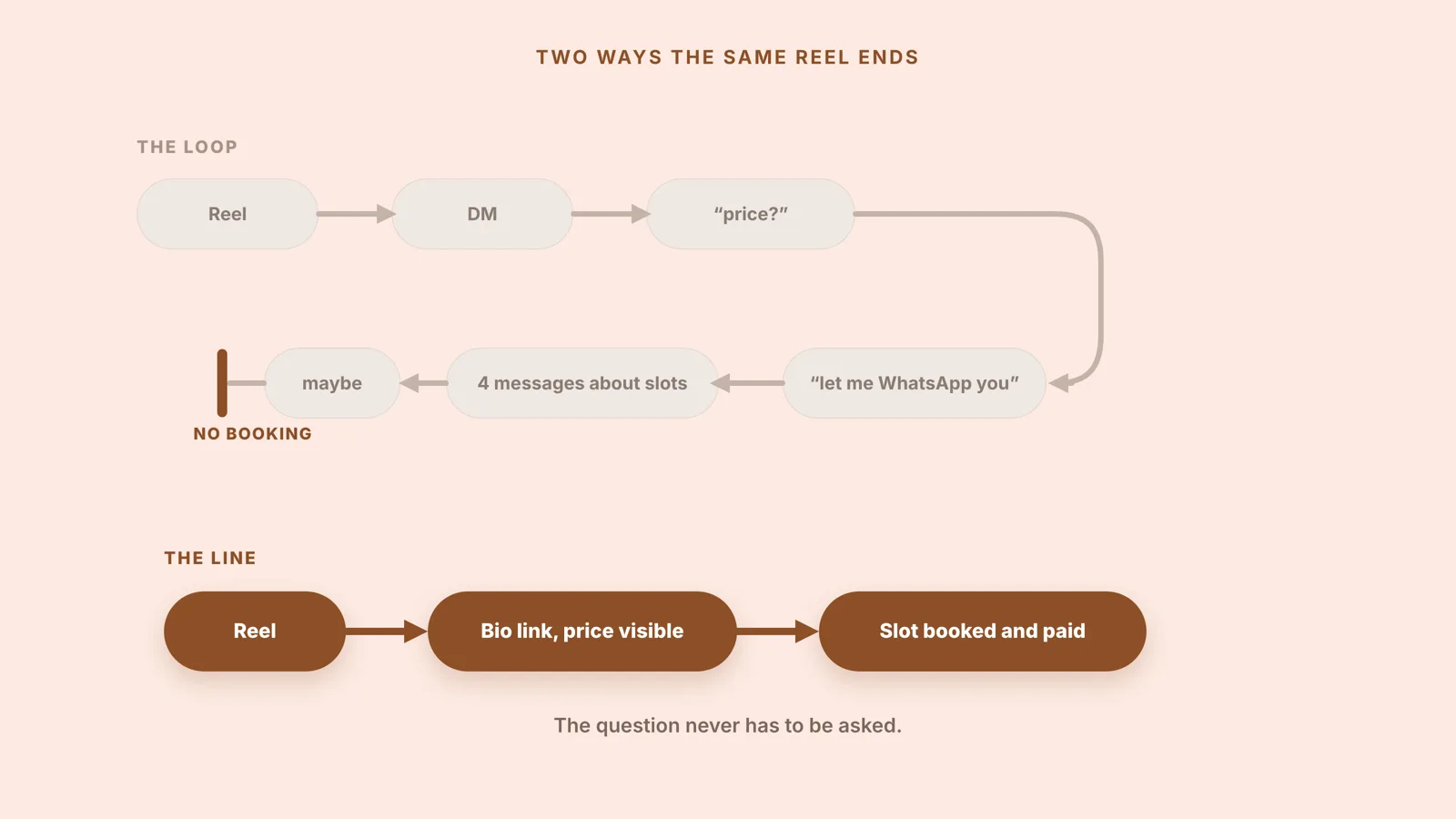
Here is the sequence the link is supposed to interrupt, and anyone taking enquiries from Instagram in India will recognise it. A reel does well. Someone watches it, taps through to the profile, and sends a DM. The DM says price? You reply. They ask what is included. You say let me WhatsApp you. Four messages later you are still comparing Tuesday evening against Thursday morning, and the booking is a maybe. The reel worked. Everything after it leaked.
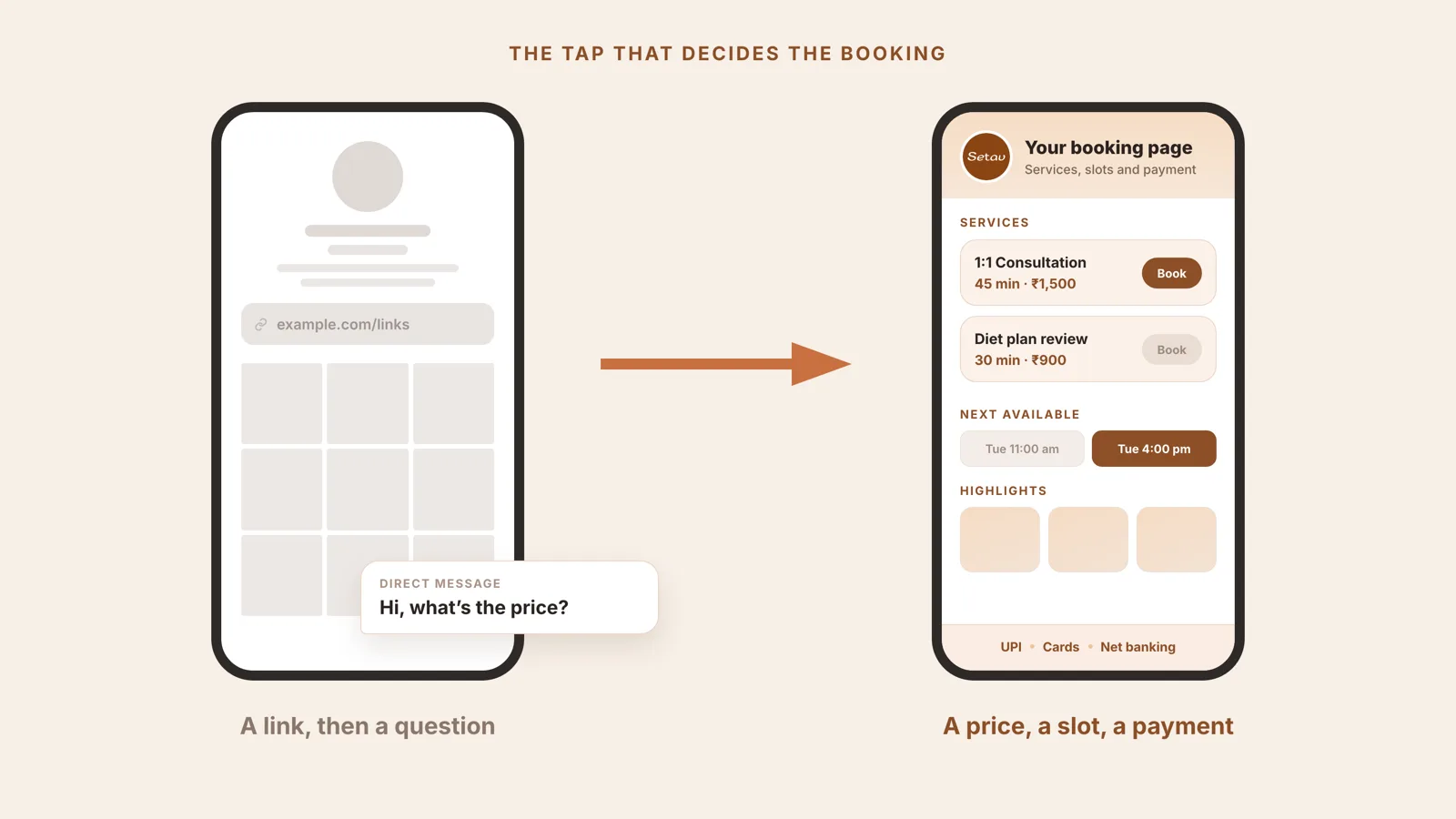
The single biggest reason that loop starts is a missing price, and there is already a whole argument about why "DM me for pricing" costs you clients, so this post will not repeat it. The relevant point here is narrower: adding a booking link does not, on its own, fix it.
A bare calendar link is the usual half-solution. Someone taps it, lands on a grid of time slots, and finds no service description and no price anywhere on the page. They do not book a slot for an amount they have not been told. They go back to the profile and open the DM to ask, which is precisely the loop you were trying to escape, now with an extra step in it.
What the link should open is a bio link page that shows your services and prices. Not a menu of buttons and not an empty calendar. Each service written out with what it is, how long it runs and what it costs in rupees, so the tap after the reel answers the price question instead of prompting it.
The next objection is the honest one: showing a price is not the same as collecting it. So the page should also take the payment in the same tap that took the slot, over UPI, cards, net banking or wallets, rather than sending the client back to a screenshot of a QR code and a follow-up message asking whether it went through. On Setav, setting that up needs an IFSC code and an account number rather than a payment gateway account or API keys, money reaches your account within 2 working days when clients use Pay via Setav, and Setav takes no commission on your bookings.
The last worry is the one every solo professional has before they put a booking link anywhere public, which is that strangers will now fill their calendar at seven in the morning. That is a settings problem, not a reason to avoid the link. Before you publish it, set your available slots and a notice period so nobody can book you for the next twenty minutes, block the breaks you actually take, and sync the calendar you already live in so a booking cannot land on top of something else.
Put together, that is the difference between the two paths in the picture above. A nutritionist in Pune running the loop version answers the same three questions about price, duration and availability several times a day, in a chat window, for free. The same nutritionist running the other version publishes those three answers once, on a page, and spends the DM on the questions a page genuinely cannot answer.
Which Link Should Go First in Your Bio
Five slots sounds like room to be generous. It is not. Attention on a profile falls away fast, and most people who tap anything tap the first thing. Treat slot one as the only slot you are confident about, and order the rest by what they are actually for rather than by how proud you are of them.
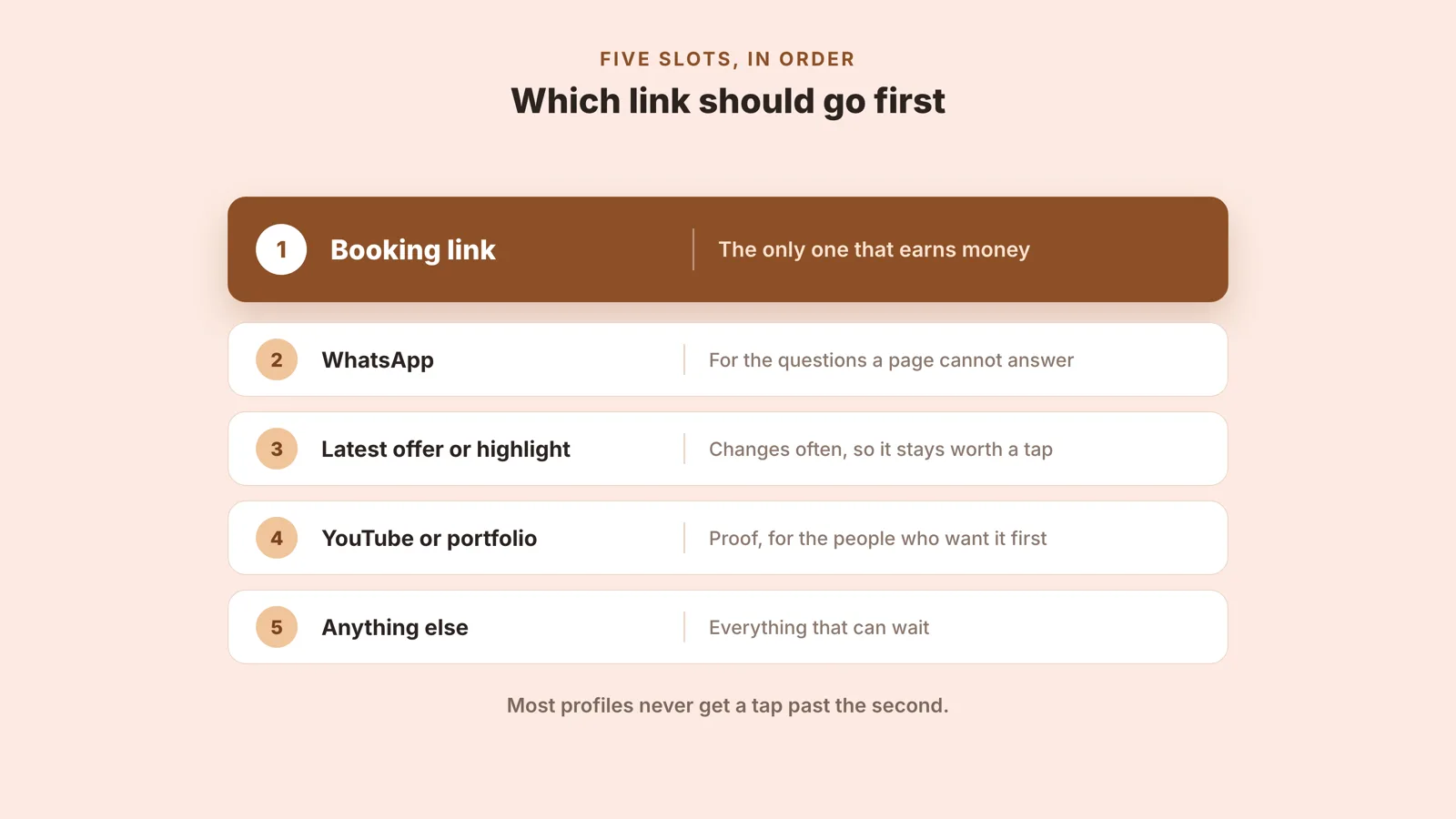
The booking link goes first because it is the only one that can end in money. Put WhatsApp second, deliberately: some people will never book without asking a human something first, and it is better that they ask you there than that they leave. Slot three is for whatever is current, an offer or a new batch or a workshop, and it earns its place by changing. Slots four and five are proof and everything else, a portfolio, a channel, a press mention, in that order.
If the order is wrong today, it is a thirty second fix rather than a rebuild. In the same Links screen, tap Options, then Reorder links, and drag them. Worth doing before you push a campaign at the profile rather than after.
Put the Same Link Where People Actually Tap
The bio is one surface and it is not the busiest one. The same URL should be everywhere a person might decide to book, because the decision rarely happens on the profile page itself.
Stories. Add the Link sticker while composing, paste the URL and put it where a thumb rests. Instagram lists Link among the stickers available on a story.
Highlights. Save that story to a Highlight and it stays on the profile after 24 hours, which turns a one-day link into a permanent one. Check it opens from the Highlight yourself before you rely on it.
A pinned post. Captions cannot hold a tappable link, but a pinned post can carry the sentence that sends people to the bio, which is the next best thing and costs nothing.
WhatsApp. Your status, and the reply you send when somebody asks. One link beats retyping your rates for the fourth time this week.
a QR code for printed material on the clinic desk, the visiting card, the studio window or the back of a flyer, so the offline half of your business lands on the same page as the online half.
None of these is a separate project. It is one URL, pasted in five places, and the reason to do all five is that you cannot predict which one a given client will use.
Test It Like a Client Before You Post It
The failure that costs the most is the one where the link is live, looks correct to you, and quietly does not work for anybody else. Ten minutes with your own phone, pretending to be a stranger, catches nearly all of it.
Open it on mobile data with wifi off. A page that only loads on your home connection is not live.
Open it while logged out, or from a second phone, so you are seeing what a stranger sees rather than what an owner sees.
Check that a price is visible without scrolling. If the first screen has no number on it, the DM is coming.
Tap it from inside Instagram rather than from your browser, since that is where it will actually be opened.
Book yourself a real slot and take the payment through to the end, including the confirmation the client receives.
Read the link title on the profile as though you had never seen it. Does it say what happens next?
Do that once when you set it up, and again after any change to your services or prices. It is the cheapest quality check in the whole workflow, and it is the one almost nobody runs.
Frequently Asked Questions
Yes. The Links section inside Edit profile is there on personal accounts as well as business and creator ones, and it accepts any URL, including a booking page. What a personal account cannot have is the native Book Now action button, which Instagram limits to business and creator accounts.
No. Instagram only needs a URL that opens, and a bio link page is enough. What matters is what the page does once it opens. If it lists your services with prices and lets someone pick a slot and pay for it, it has done the job a full website would have done here.
Yes. Add the Link sticker while you are composing the story, paste your booking page URL and place it where a thumb naturally lands. Instagram lists Link among the stickers you can add to a story. Save that story to a Highlight so it stays on your profile once the 24 hours are up.
Open your profile in the Instagram app, tap Edit profile, tap Links, then tap Add external link, paste the URL and tap Done. The option lives in the phone app only. Instagram's own help page for this says the feature is not available on computers.
Five. Instagram's help centre states that you can add up to five websites to your profile, and the same Links screen lets you drag them into whatever order you want. If you have more than five destinations, point one of the five at a page that holds the rest.
Three requirements usually explain it. The action button is available on business and creator accounts only. It has to be connected to a tool on Instagram's approved partner list, and you need an existing account with that tool already. Only one action button can be shown on a profile at a time.
Put a page behind the link that shows your services, your prices and your open slots. Free to start, no credit card.
Turn conversations into customers with Setav's smart all-in-one professional storefront platform.
All Rights Reserved © Setav 2026